Appointment reminders sent from your own Telegram and WhatsApp — automatically, from Altegio.

Keep-Them uses current Altegio booking data to send eligible appointment messages at configurable times — by default, reminders are scheduled 24 hours and 2 hours before the visit — from your connected WhatsApp and Telegram accounts. Replies stay in the originating messenger, and clients need no separate Keep-Them app.

Current Altegio detailsConfigurable reminder timingReplies in the originating messengerNo separate client app
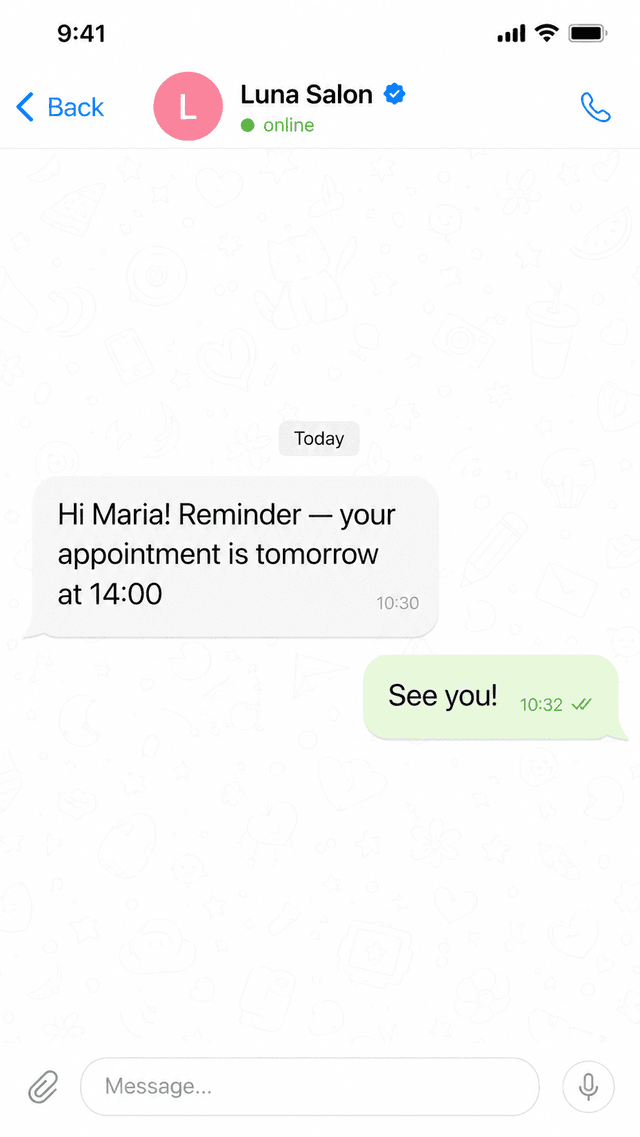
Telegram chat showing an appointment reminder from the salon and the client replying

When a client forgets an appointment, the chair sits empty. SMS costs add up, and manual reminder calls are easy to miss.

Why it works

It looks like you — because it is you.

Reminders go out from your own number, in a chat your client already uses — not from an anonymous bot they have to start first.

?
reminder_bot_12bot
Reminder: appointment tomorrow, 14:00. Reply STOP to unsubscribe.
This bot can’t read replies.
An anonymous bot — clients must /start it first
L
Luna Salononline
Hi Maria! Quick reminder — see you tomorrow at 14:00
Can we move it to 15:00?
Of course — see you at 15:00 🙌
Your own account — they already know the name

Clients can recognise the sender and reply in the same conversation. The reply remains in the WhatsApp or Telegram account your team connected.

How it works

Connect it, review the settings, then enable client messages.

Connect through Altegio, pair a messenger account, review templates and timing, then approve go-live.

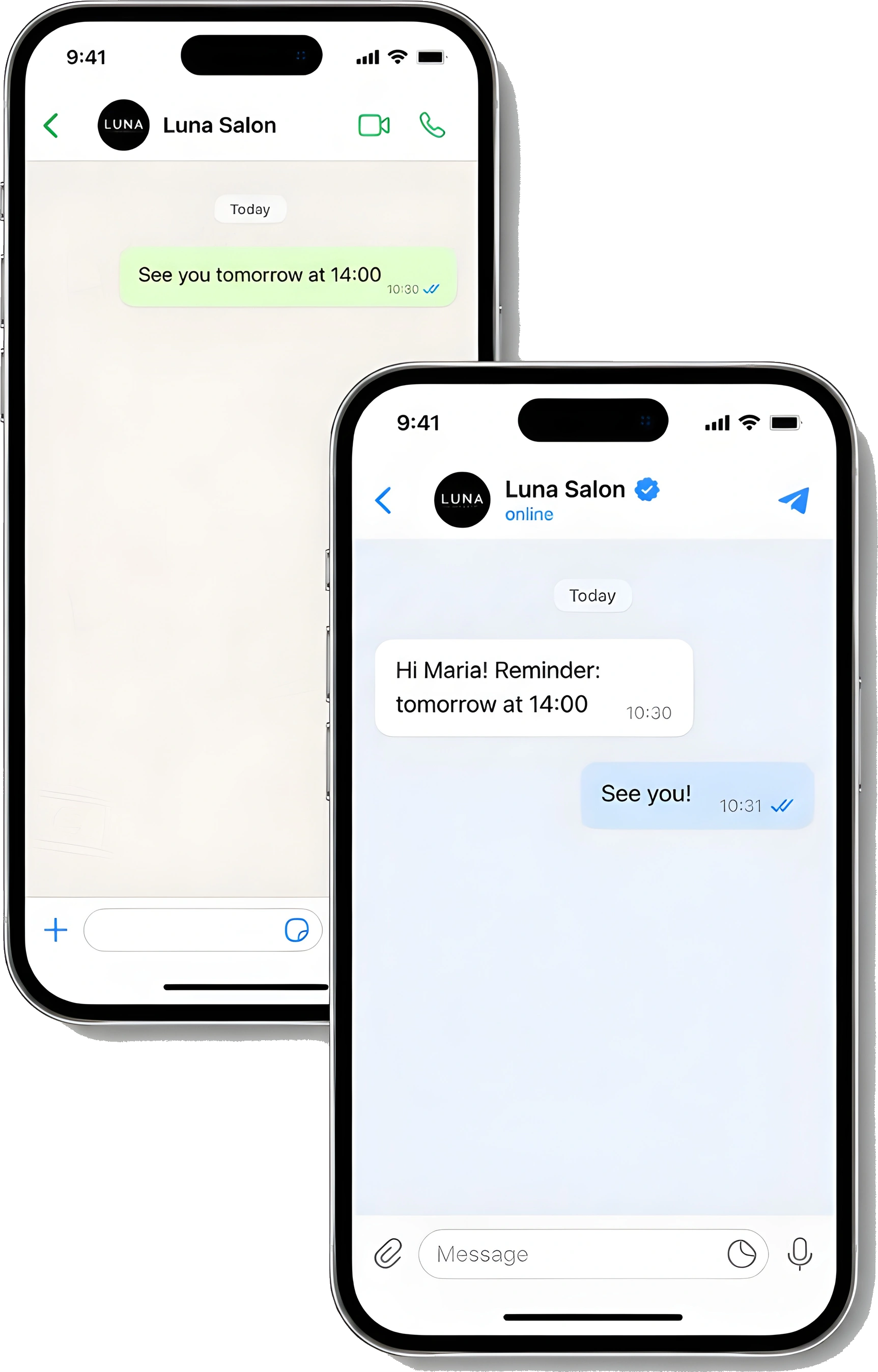
Two phones: a Telegram and a WhatsApp reminder from the salon, with the client replying
1

Install the app in Altegio

One click from your Altegio Marketplace. No data exports, no integrators, no IT team.

Marketplace setup
2

Connect your Telegram and WhatsApp

WhatsApp pairs by scanning a QR code — exactly like WhatsApp Web. Telegram signs in once with your phone number and a login code, the same way you'd add a new device. Once the location and client messages are enabled, eligible messages can use those connected accounts.

QR code or login code
3

Review and enable client messages

Send an approved test, review the templates and timing, then enable client messages after the location is active. Eligible future messages follow the enabled events, and replies remain in the messenger that sent them.

Owner-controlled go-live
Features

Everything a reminder needs — nothing it doesn’t.

Set templates and timing in the dashboard. Keep-Them schedules eligible appointment messages, routes them through connected WhatsApp and Telegram, and keeps replies in the originating messenger.

How Keep-Them works: a booking in Altegio triggers an automatic reminder to the client's phone

Configurable reminder timing

Eligible future appointments use the enabled reminder events; the defaults are 24 hours and 2 hours before the visit.

Your own Telegram and WhatsApp

Messages use connected WhatsApp first and connected Telegram as fallback. SMS is not supported.

Templates you control

Name, service, staff and time fill in automatically.

Replies in your own chat

A client's answer lands in the same chat — no separate inbox.

Bookings stay current

Move or cancel in Altegio and future reminders are recalculated from the current booking state.

Opt-out handling

WhatsApp STOP requests suppress future automated messages for that salon. Telegram opt-out requests must be handled by the salon team.

Privacy and trust

Built around your clients’ privacy.

Client data belongs in your booking system — not scattered across another company’s database.

Hosted in the EU

Servers in Germany. A DPA is available on request.

You stay in control

Revoke our access to your Telegram in one tap, any time — straight from Telegram's own settings.

Installed through Altegio

Install through the Altegio Marketplace. Manage the subscription from the Keep-Them dashboard using the billing options available for your account, or contact support when self-service billing is unavailable.

Pricing

One Start plan. Better pricing as you grow.

Every location gets the same features, its own channels and settings, and one shared subscription. Start costs €19/month for one location, €17 per location for 2–4, and €15 per location for 5; networks with 6+ use custom terms.

Start
19/location/mo
  • Configurable reminders for eligible future visits — 24h and 2h defaults, through WhatsApp and Telegram(not a faceless bot)
  • Booking confirmation, change and cancellation messages
  • Guided Altegio setup after connection verification
  • Editable templates, custom send times, per-event toggles
  • Reminder delivery log and account dashboard

Volume pricing for the same Start plan

One dashboard and one subscription. Each location stays isolated.

  • 2–4 locations€17 per location
  • 5 locations€15 per location
  • 6+ locationscustom terms — contact us
  • Separate channels, templates and settings for every location
FAQ

Questions we usually get

Is it safe to connect my Telegram account?
The login code and, when enabled, your Telegram two-factor password are processed only while authorising the session; Keep-Them does not store them. You can revoke the resulting session in Telegram: open Settings, then Devices, and end the session.
What if a client is unavailable on WhatsApp?
The normal route tries connected WhatsApp first. If that route is unavailable and Telegram is connected, Keep-Them can try Telegram as the fallback. SMS is not supported.
Can I edit the reminder text?
Yes. Every template is editable from the dashboard — the booking confirmation, change and cancellation messages plus the 24-hour and 2-hour reminders — and client name, staff member, time and service are filled in automatically. You can also adjust how far ahead each reminder goes out.
Will it actually reduce no-shows?
Reminders are intended to reduce forgotten visits, but no message guarantees attendance. Measure delivered messages, useful replies, early cancellations and no-shows against your own baseline.
What happens to my clients' personal data?
Altegio stays the system of record, and Keep-Them does not build a permanent client directory. Names and phone numbers are fetched when needed; the core database does not retain them, while delivery infrastructure may temporarily cache channel availability. Required booking identifiers, appointment time, service titles, booking link, delivery state and suppression state are retained for operation and audit. A DPA is available on request.
Does it work with WhatsApp?
Yes. Reminders go out from your own WhatsApp — Keep-Them links to it like WhatsApp Web on an extra device, so clients see your number, not a bot.
Which booking systems do you support?
Altegio is the booking system supported today. If you use another system, tell us what you need and we will record the request.
How do I turn it off?
Remove Keep-Them in the Altegio Marketplace to stop Altegio access and new booking events. Disconnect Telegram and WhatsApp in the Keep-Them dashboard too; if a remote sign-out cannot be confirmed, finish it in the linked-devices settings of that messenger.

Connect Altegio, review the settings, then choose when to go live.

Create your Keep-Them account and follow the guided setup. Start costs €19/month for one location, €17 per location for 2–4, and €15 per location for 5; contact us for 6+ locations.

Questions? Email info@keep-them.com — we will get back to you as soon as we can.